Build Docker Images Safely with ktl build
A direct guide to safer image builds, with sandboxed execution, stronger policy controls, and traceable build outputs.
Image builds run code. That means every Docker build is both a packaging step and a security step. If the builder is too open, a bad dependency or a wrong script can reach places it should not.
ktl build keeps the workflow familiar but adds controls: sandboxing, policy checks,
secret leak checks, attestation output, and cache diagnostics.
This guide shows how these controls work in practice, with direct commands and demos you can run.
Full docs: https://kubekattle.github.io/ktl/.
Quick comparison
| Capability | default docker build | ktl build |
|---|---|---|
| Sandboxing | Not built in as a first-class build flag. | Built-in sandbox flow on Linux with runtime policy and diagnostics. |
| Policy gates | Manual integration required. | --policy and --policy-mode enforce in the build command. |
| Secret checks | Usually external tooling. | --secrets warn|block|off built in. |
| Attestations | Extra setup and tooling. | --sbom, --provenance, --attest-dir integrated. |
| Cache report | No opinionated summary by default. | --cache-intel shows misses, slow steps, and hit ratio. |
Why safe builds are now mandatory
A lot of CI systems still treat image build stages as harmless plumbing. In reality, build jobs are one of the highest-risk points in a pipeline because they execute untrusted or semi-trusted code on your infrastructure. Typical pitfalls include broad host mounts, permissive environment variables, accidental credential exposure, unrestricted egress, and weak traceability for what got shipped.
When an incident happens, the painful questions usually look the same: Which dependency was pulled?
Which script ran? Could it access host-only files? Did we produce a bill of materials? Can we prove the
provenance of this artifact? ktl build answers those questions with explicit controls and outputs
instead of ad hoc scripts.
How sandboxing works with nsjail
On Linux, ktl build can run inside a sandbox runtime (nsjail) with a policy file. Think of this as
giving the build process a controlled room to work in. It gets only the mounts and runtime capabilities
it needs, rather than broad host access. That means filesystem visibility is explicit, and high-risk
assumptions become visible quickly.
A practical detail that teams appreciate: ktl build sandbox doctor exists to verify the environment
before running a real build. It checks mount/bind/network probes so you can confirm the sandbox is
healthy. Then, when you run the build with --sandbox-logs, you see the sandbox lifecycle in
prefixed logs. This is important because strict policies without diagnostics are hard to operate.
In our lab environment we used an nsjail wrapper for mount API compatibility and then executed sandboxed
builds with explicit flags such as --sandbox, --sandbox-config, and --sandbox-bind-home
(when builder bootstrap needed home directory access). The key point is not one exact flag combo; the key
point is that access is intentional, reviewable, and debuggable.
Other useful ktl build features
Sandbox is only one part of ktl build. These features are useful in real projects and are worth
using together.
--hermetic(or--locked) to reduce network access and enforce pinned bases.
When to use: reproducible CI builds and dependency-sensitive repos.--secureas a shortcut preset for stricter builds.
When to use: release pipelines where you want safer defaults in one flag.--policyand--policy-mode enforceto block builds that fail your rules.
When to use: team-wide guardrails that must fail fast.--secrets blockto fail on detected secret-leak risks.
When to use: repos with many env-based credentials or generated config files.--capture ./ktl-capture.sqliteto keep a build event timeline for later debugging.
When to use: flaky CI builds or intermittent buildkit issues.--ws-listen :9085to stream raw build events to external viewers.
When to use: remote observers or custom dashboards.--cache-intelfor a fast summary of cache misses and slow steps.
When to use: ongoing Dockerfile optimization work.
Command
ktl build . \
  -t ghcr.io/acme/app:dev \
  --secure \
  --policy ./policy \
  --secrets block \
  --capture ./ktl-capture.sqlite \
  --cache-intel
You do not need to turn on everything at once. Start with one or two controls, run it in CI for a few days, then tighten the defaults.
Real failure example
Example: a build fails because secret checks are in blocking mode and a risky pattern is detected.
Failure output
Error: secrets scan failed (mode=block)
- rule: possible-secret-in-build-arg
- location: Dockerfile:12
- value: ARG AWS_SECRET_ACCESS_KEY=...
Fix
# move secret usage to BuildKit secret mounts and keep scans in blocking mode
ktl build . \
  -t ghcr.io/acme/app:dev \
  --secret AWS_SECRET_ACCESS_KEY \
  --secrets block
Copy/paste starters
Dev build (fast feedback)
ktl build . -t ghcr.io/acme/app:dev --cache-intel --output logsStrict CI build
ktl build . -t ghcr.io/acme/app:ci --secure --policy ./policy --secrets block --cache-intelAttested release build
ktl build . \
  -t ghcr.io/acme/app:release \
  --oci \
  --sbom \
  --provenance \
  --attest-dir ./out-attest \
  --push
Demo Showcase 1: Sandbox doctor + sandboxed build
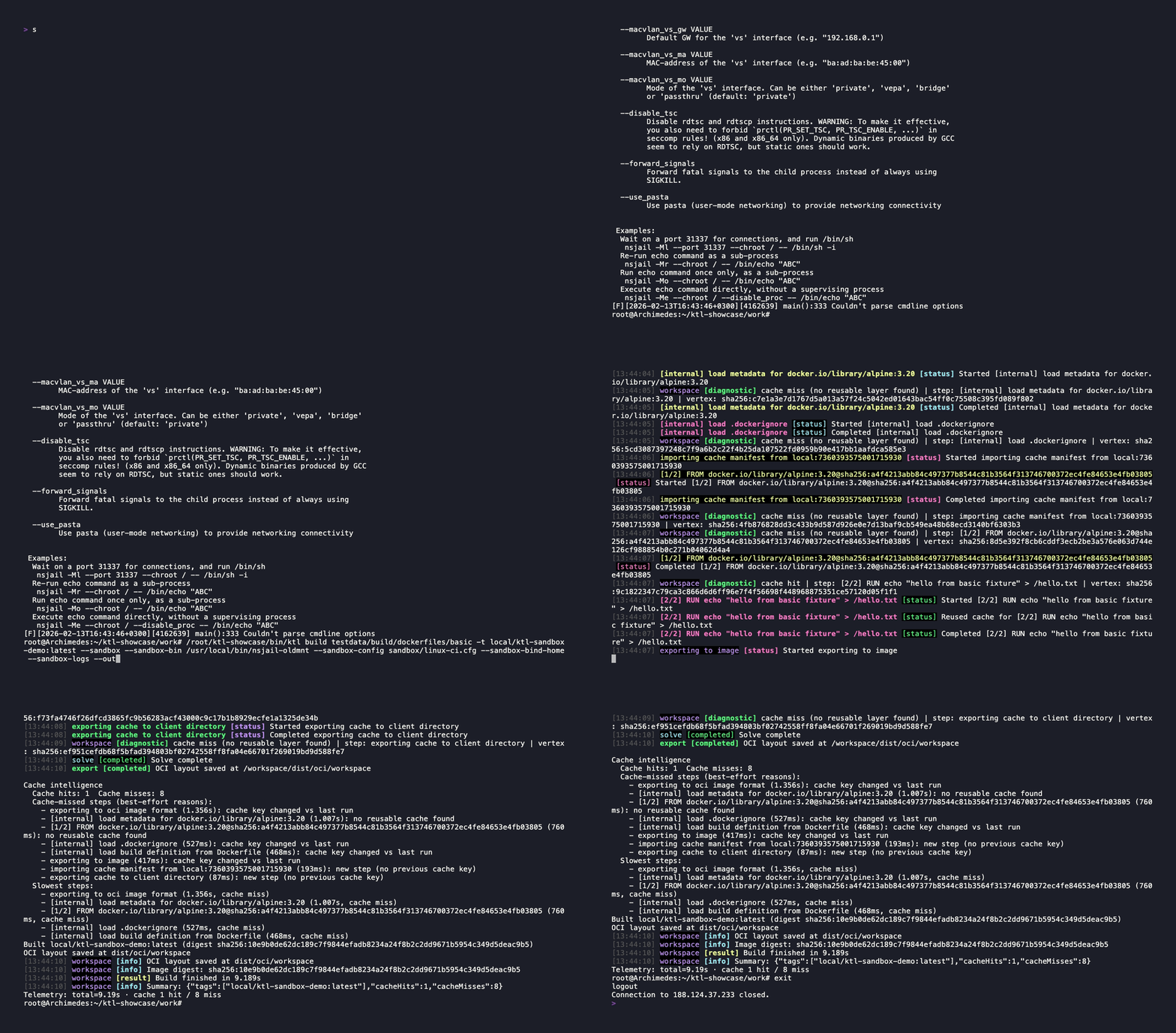
The first demo establishes trust in the runtime itself. We start by running doctor probes against the selected sandbox policy and runtime binary. Then we run a real Dockerfile build in sandbox mode and stream sandbox logs to show exactly what is mounted and executed.
Command
ktl build sandbox doctor \
  --sandbox-bin /usr/local/bin/nsjail-oldmnt \
  --sandbox-config sandbox/linux-ci.cfg

ktl build testdata/build/dockerfiles/basic \
  -t local/ktl-sandbox-demo:latest \
  --sandbox \
  --sandbox-bin /usr/local/bin/nsjail-oldmnt \
  --sandbox-config sandbox/linux-ci.cfg \
  --sandbox-bind-home \
  --sandbox-logs \
  --output logs
This demo shows both parts clearly: security controls and a successful build. You can see sandbox lifecycle events and still end up with a usable image.
Demo Showcase 2: Cache intelligence (cold vs warm)
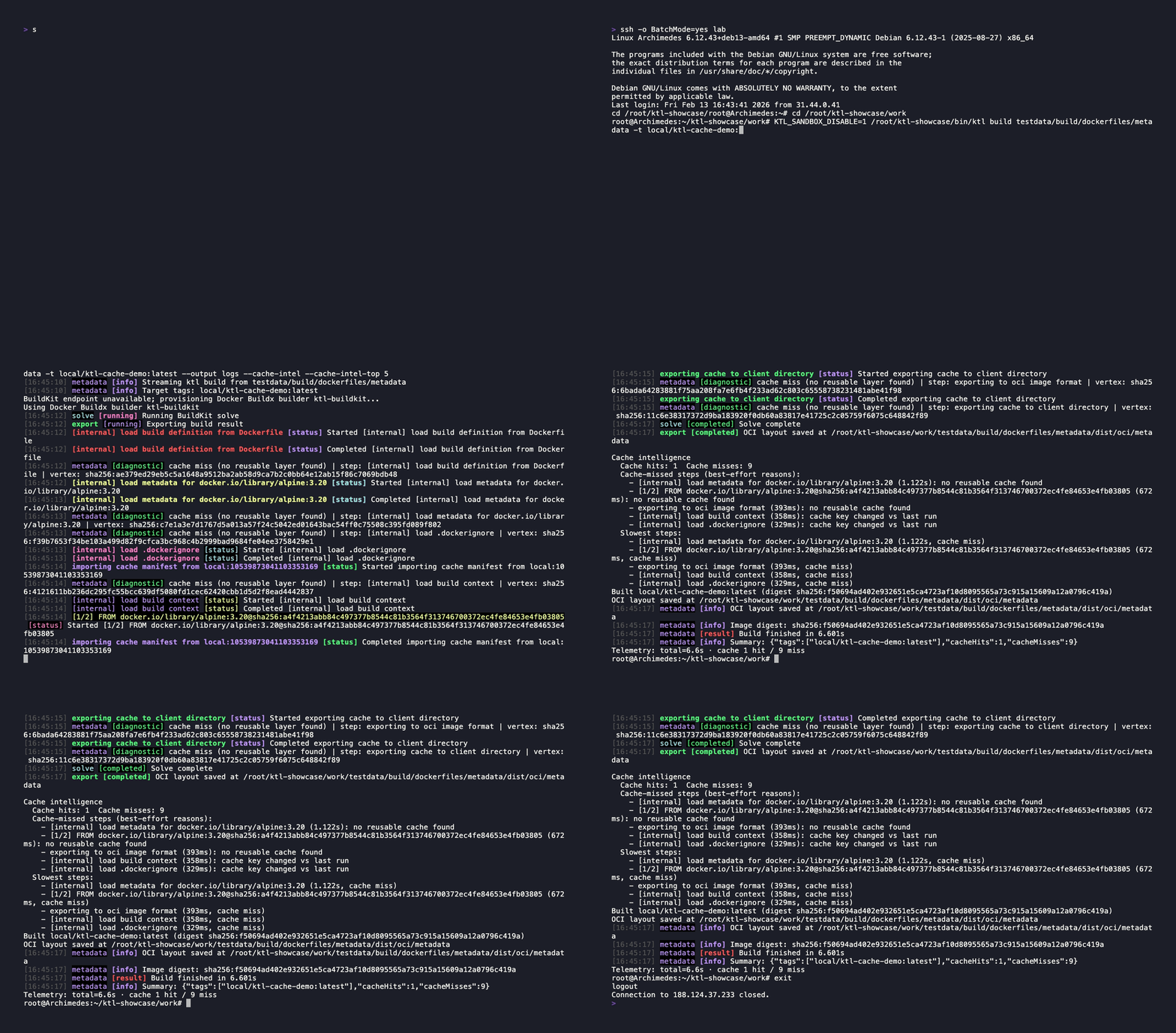
Security alone is not enough; teams still need speed. The second demo highlights cache intelligence by running the same build twice and comparing results. The first run shows more misses and slow export steps. The second run surfaces improved hit ratios and faster path reuse.
Command
KTL_SANDBOX_DISABLE=1 ktl build testdata/build/dockerfiles/metadata \
  -t local/ktl-cache-demo:latest \
  --output logs \
  --cache-intel \
  --cache-intel-top 5

# run again with the same command to highlight warm-cache behavior
The cache report is especially useful in reviews because it calls out miss reasons and slow steps instead of leaving people to guess why a build got slower. This is the bridge between platform engineering and app teams: you can discuss concrete numbers and concrete Dockerfile improvements.
Demo Showcase 3: SBOM + provenance attestations
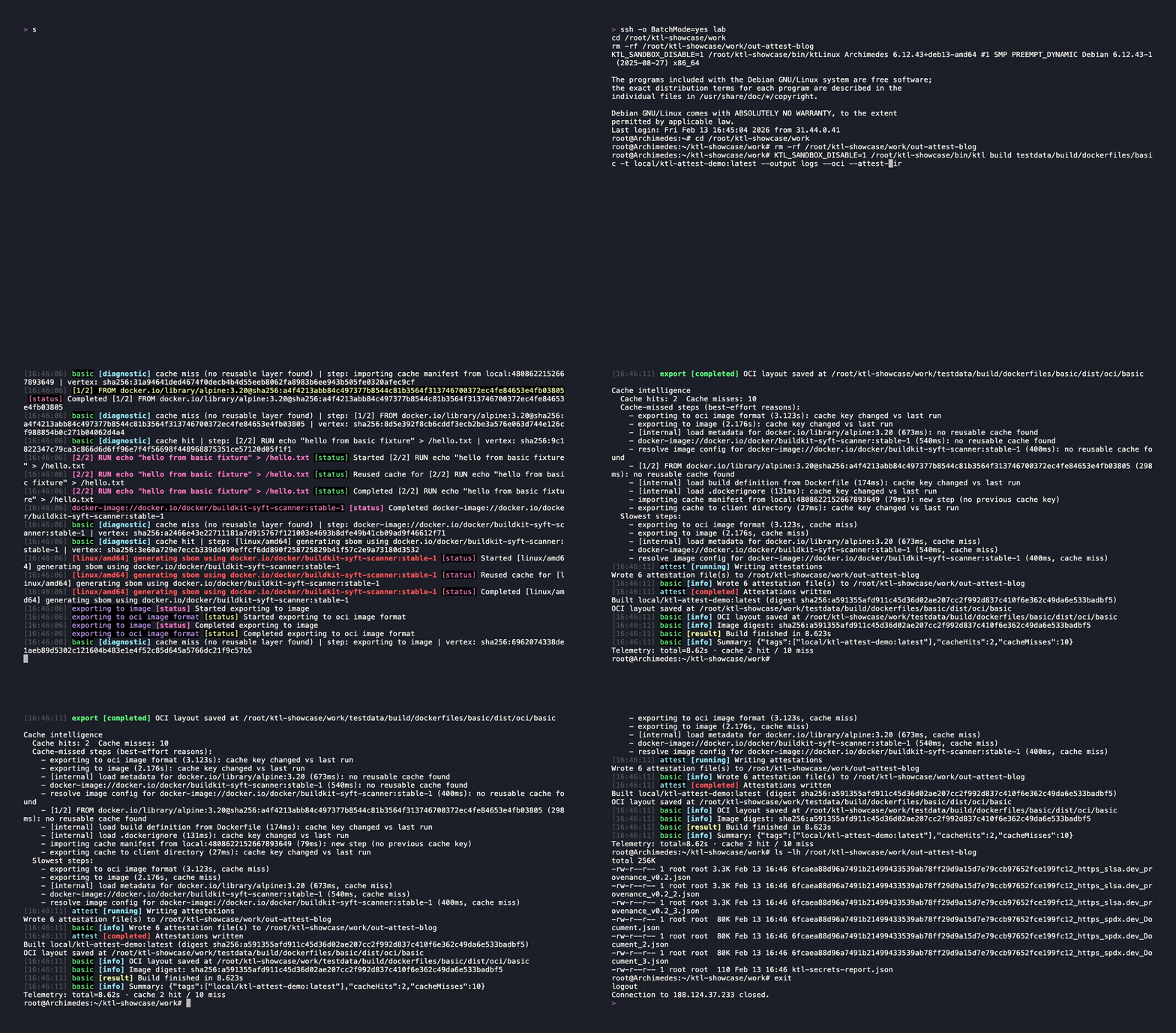
The third demo focuses on artifact trust. We build with OCI output and write attestations to a dedicated directory while enabling SBOM and provenance generation. After the build, we list the produced JSON files and inspect the provenance document.
Command
KTL_SANDBOX_DISABLE=1 ktl build testdata/build/dockerfiles/basic \
  -t local/ktl-attest-demo:latest \
  --output logs \
  --oci \
  --attest-dir ./out-attest \
  --sbom \
  --provenance

ls -lh ./out-attest
This moves the build from \"we produced an image\" to \"we can explain what is inside it and how it was built.\" SBOM gives a component inventory, and provenance records build details in machine-readable form.
Pragmatic rollout strategy
If you are adopting this in an existing org, do it in layers. Start with one representative service and one sandbox profile. Validate with sandbox doctor. Turn on sandbox logs while tuning. Introduce cache intel reports for visibility. Then add SBOM/provenance outputs to release gates. Finally, codify policy and artifacts in PR templates so the process becomes routine.
This approach avoids trying to enforce everything at once. Add controls in layers, keep the output visible, and tune the process as you go.
Final take
ktl build is not just a way to build container images. It gives you safer execution,
better diagnostics, cache visibility, and artifact evidence in one flow.
Fast builds matter. Fast builds with clear security controls and traceable output matter more.
For flags, examples, and updates, check the ktl docs.
Specific references: build flags, sandbox config, policy and troubleshooting, attestation and release flow.